AI Agents: Not picking action tools always

Hi All,

I am working on small POCs using agentic AI. I have built an agent and configured it within a workflow. In this workflow, whenever a document is uploaded, it is consumed by the agent. If the document is identified as a bank transaction, the decision should be “Approve”; otherwise, it should be “Reject.”

I am receiving the below decision output correctly.

*Based on the bank statement summary provided, here is my analysis:

**Decision: APPROVE**

**Reasoning:**

  • The document is confirmed to be a legitimate bank statement from Standard Chartered Bank with proper identification (Account No. 42710540422, account holder name, statement period)
  • Standard banking details are present and authentic, including MICR codes, IFSC codes, branch address, and other regulatory information
  • Transaction patterns are normal and consistent with regular personal banking activity (ATM withdrawals, UPI payments, utility payments, online shopping, deposits)
  • All transactions appear genuine with no suspicious or fraudulent elements detected
  • The statement covers a standard monthly period (June 16, 2019 to July 16, 2019) with no anomalies or inconsistencies

**Red Flags Identified:**

  • None. The statement is clean and legitimate.*

The document qualifies as a valid bank statement with no major issues requiring rejection.

Based on this decision, I want the agent to trigger an automation action that updates a dummy case with the corresponding status. I have already configured the automation action and activity to open the work object and update the value.

However, I am facing an issue: when I upload documents multiple times (e.g., 10 times), the automation action is triggered only 1–2 times. For the remaining cases, nothing happens even though the agent decision shows as “Approved.”

Could someone please help me understand what might be going wrong? Is there an issue with the tool description, phrasing, or any configuration that I might be missing?

Note: I am using the Pega Community Edition for this POC.

Apart from above, i have one question if the UI KIT application is hosted on pega infinity 25, can we leverage all the pega AI features in existing UI KIT application?

Thanks
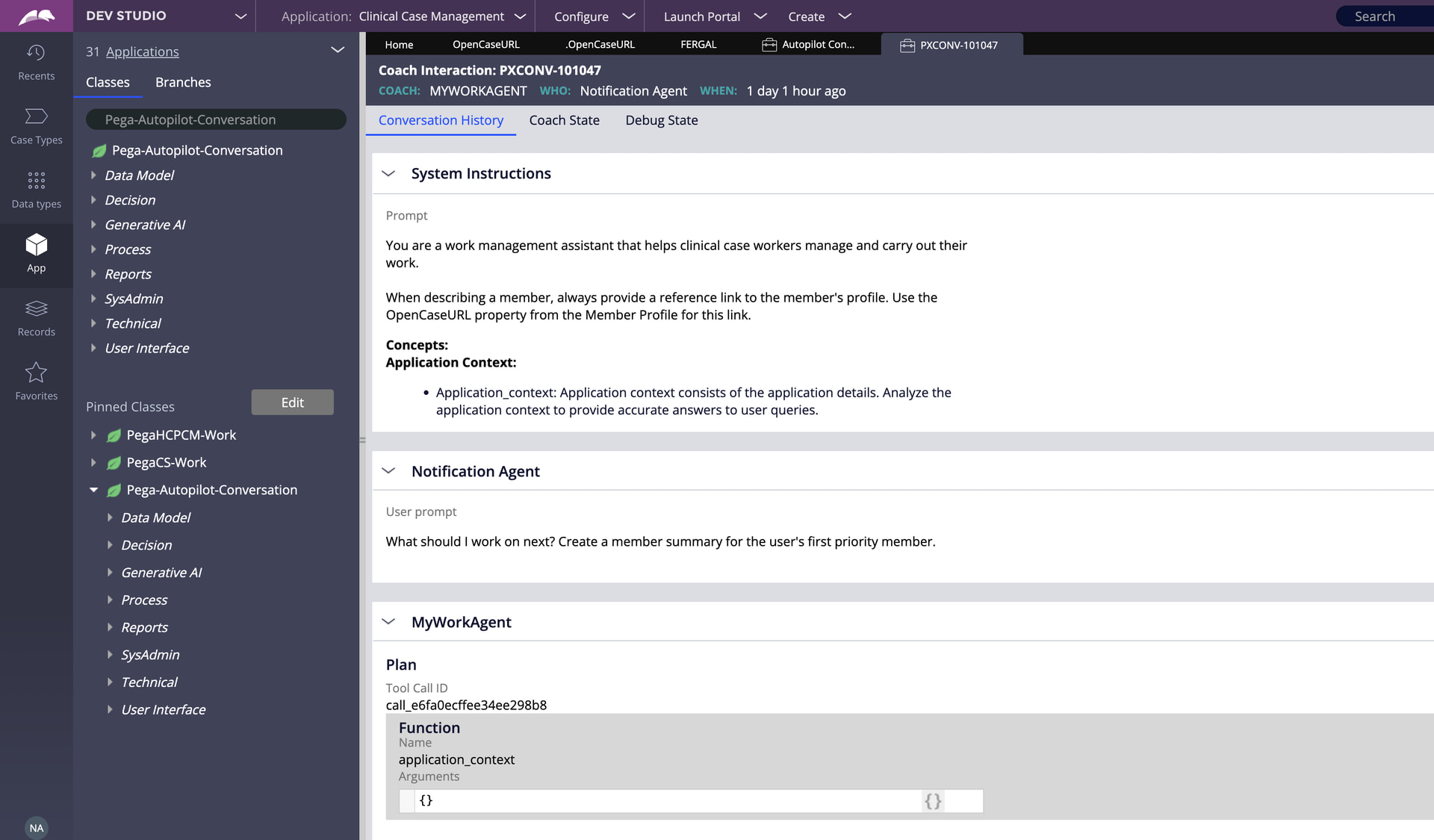
If the action you want to take is based purely on the approve/reject recommendation of the agent, then you could do this in standard case processing after the agent runs. No AI required. Output the recommendation of the agent to a case property and use this to drive the case update logic.

Please find the AI features supported in Traditional application

https://forums.pega.com/t/pega-genai-ui-architecture-and-version-support/11596

Thanks for your response, what you suggested is correct but here i want to perform POC what actions can be taken the agent, from the POC perspective can you guide why agent is not processing the relevant action always?

Have a look at the Pega-Autopilot-Conversation instances in Dev Studio - this will show details of all of the agent interactions, the plan that the agent came up with for each interactions and the tools that it decided needed to be called in that instance

This is a well-known LLM non-determinism challenge in agentic workflows.
You’re not doing anything wrong conceptually.

LLMs (even with the same prompt) don’t always call the same tools on every invocation. Tool selection depends on the model’s probabilistic output. Without strong prompt engineering or deterministic constraints, you’ll see inconsistency (1–2 out of 10).

Either use deterministic approach or enhance Prompt Engineering.

Improvements using Prompt Engineering:

  • Strengthen the tool description. The action tool description is what the LLM uses to decide whether to call it. Make it unambiguous.

  • Add explicit instruction in the agent prompt. In the agent’s system/instruction prompt, add an explicit step

Improvements using Determinism:

  • Consider a deterministic post-agent step. For production patterns, rather than relying on the agent to self-trigger the automation, have the workflow read the agent’s decision output after the agent step completes and use a standard Pega decision shape/automation shape to trigger the case update. This makes the action 100% reliable regardless of LLM tool-calling behavior.

Best Practices and Accuracy/Reliability Requirements commonly point towards favoring a deterministic approach.