Pega Robotics Challenge "Creating Windows form and procedure automations" help

Hi ,

I am trying to complete the challenge but I am stuck. I created the windows form with the 3 controls (label, textbox, button)

When I try to run/debug, the test form always opens but nothing happens after I click the button, the browser sign in screen does not open.

( I also do not see the javascript from step 4.5 in the source code - not sure if it is in a separate js file)

@JMark515 I am not immediately familiar with the exact challenge you are looking at. Would you paste the link to it in your reply? From your screenshot though, it looks like you have your button connected in correctly for one thing.

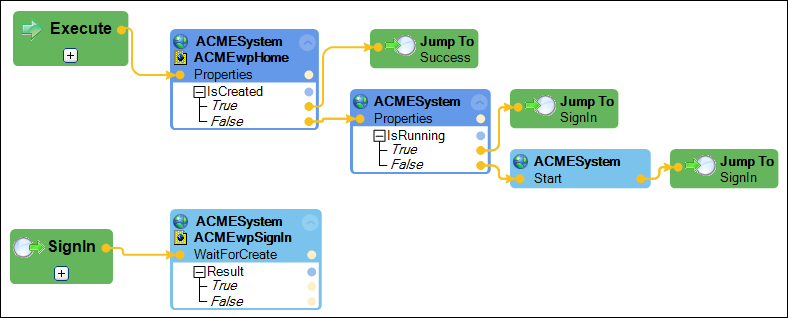
First, the button click should call the execute method of the automation in your first screenshot. Second, that button click does nothing really if the home page is created (IsCreated = true). It simply jump to success and ends the automation. I suspect you are missing some logic there to perform further steps. Third, if your home page is not created (IsCreated=false), you are checking to see if the application is running. Is it is, then you are trying to start it again. In this case, I would have to look at the challenge to see exactly what you are supposed to do, but you only want to start the application if IsRunning is false. I suspect you just have that logic reversed.

@ThomasSasnett Hi. Thanks for the reply.

This is the challenge but the automation is originally created in the challenge before

Current Challenge: Creating Windows form and procedure automations | Pega Academy

Original Challenge: Creating an automation | Pega Academy

Update: Appears you were correct about the logic being reversed. Guessing the missing logic is going to come later in the exercise.

This is the image from the course and I had the true/false connectors reversed https://academy.pega.com/sites/default/files/styles/1024/public/media/images/2020-03/me_auto1_s2_2.png?itok=w_DRFCkl

Needed that 2nd pair of eyes…