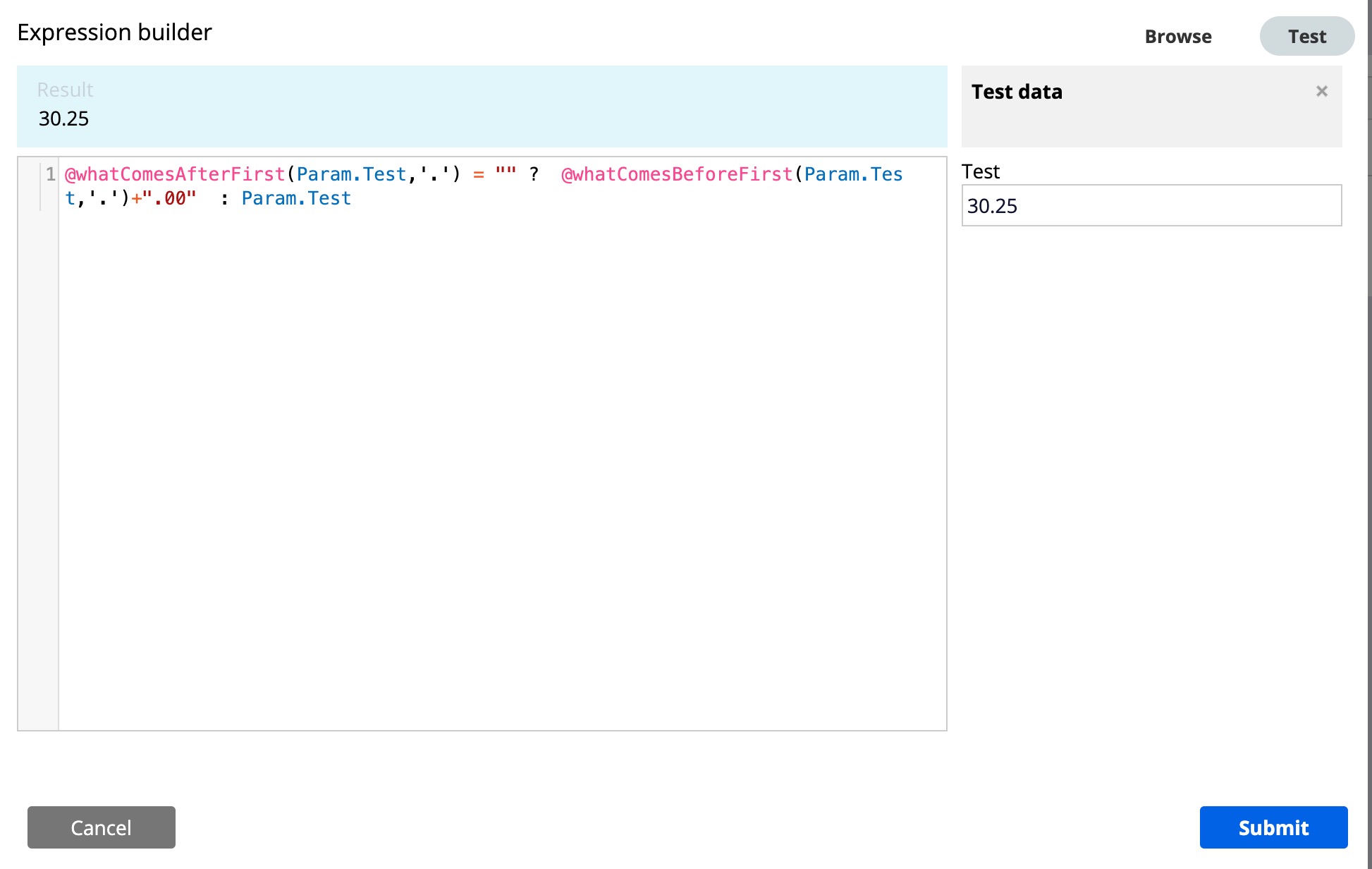
Actually, I am using Text input control for one of the properties. That is editable. In presentation tab editable format is number and read-only format also number I give decimal value 2.
While edit the numbers every time i need to give 0.00 decimal value it’s not take automatically.
I checked the checkbox under editable format also. It’s shows 0.00 but not save in clipboard.
Use integer control and in presentation tab of the configurations enable check box “Display value using read-only formatting” . And add the required formatting for read only format. On screen after entering the value on tab out from the text box then the formatting is seen.
If the property type is integer or decimal , make use of integer / number control for valid configurations.
in presentation tab of the configurations enable check box “Display value using read-only formatting”.On screen after entering the value on tab out from the text box decimal place fine on Ui but it not saved in clipboard. This is the issue I am facing.
@kirti - Formatting only on UI side and wont be saved in clipboard. To save the formatting need to call data transform on change of the text input. In actions tab add on change action and action as Data transform call. Apply the decimal values in the data transform to reflect in clipboard as mentioned by Ramesh in previous comments.
Ideally, you can transform the data based on your requirements with the help of whatcomesbefore and index function (attached screenshots for your reference).