


This is my configuration. I am selecting a particular record from the row action (user portal) and then in the user action one create case type is defined. But when I am submitting the reason for cancellation this error is coming. If I give the sysAdmin4 role to this access group then it is working fine
Ah, ok. That makes it clearer.
So I am unsure all your configuration but I have it working with both the flow action “save data page” and the “save data page” automation
Let me share my configuration, if that helps.
Run time
Configuration
- Case - the one to be created via my data object
- Property sourced from a saveable data page
- Property sourced from a saveable data page
- Appointment data object
- User Action to create the case, save the appointment to the field created in 1
- User Action to create the case, save the appointment to the field created in 1
- Case workflow
- Workflow that eventually saves the data page using automation (though i did the same on the flow action for create, this works as well)
- Workflow that eventually saves the data page using automation (though i did the same on the flow action for create, this works as well)
- Case View for create
- Added the fields directly from the field created in 1
- Important, these are from inside the data object, so like this
- I then made some fields editable and some read only (assuming some business rules here)
- Added the fields directly from the field created in 1


Stale data?
You mentioned this, so maybe you’re trying to dynamically populate this to avoid that? Which is why you are hitting this issue. Depending on the UX you would have a couple of options.
- Clear / Refresh datapage in the case when / if needed?
- Display a data reference to the live appointment details to show what the current status is (user can determine if clash)?
- Put duplicate protection in, so only 1 change can be open/active at a time?


Yeah, that was my next line of thinking - RBAC on the record. Since '25, Pega assumesyou don’t have access to cases or data unless you explicitly add them.
Blueprint makes that easy but yes, you need to specify.
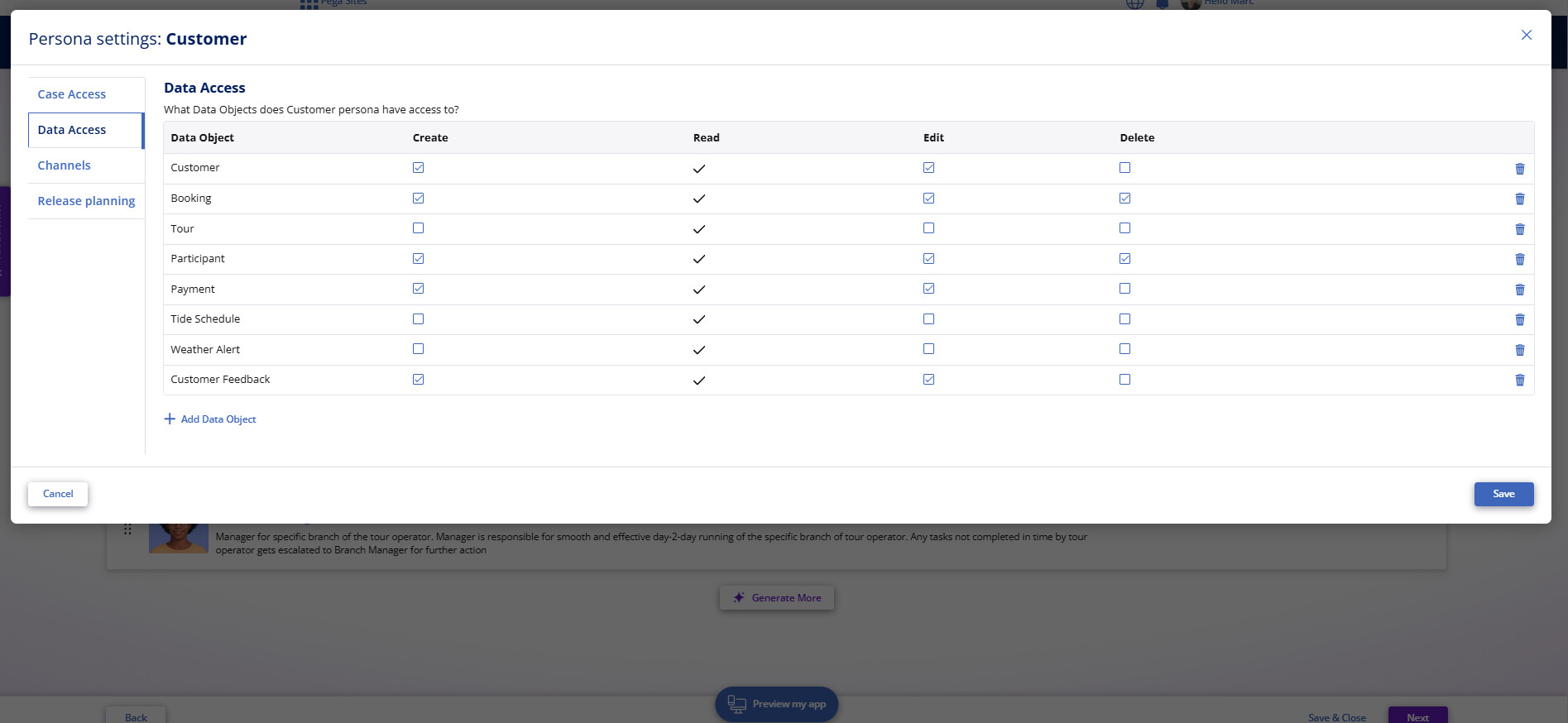
Its funny, I didn’t know this was in app studio, its hidden in dev studio.

But i’ve always used the app studio menu, Users > click Persona, which does the same thing

@JeetS17799231 i have moved this to the User Experience Expert Circle category , from General, as its a great one for Constellation.

I see you are not a member, so please join: User Experience - Pega Forums , this will allow you to respond to this thread (if you need too).
Yeah thanks for sharing. I have joined.
@JeetS17799231 Thanks for sharing the solution!
@MarcCheong - Just curious to know, what happens if there are multiple personas needs to modify this data type?
This is catered for in both Platform and Blueprint
Blueprint
You specify what each Persona has access too - this then creates an access group and RBAC rules for that access group when you import your Blueprint.
So in the below example, you’d do the activity for each of the 4 personas (else they would have zero access)

Platform (App Studio)
In App Studio, Users > User Management menu, you can view each persona (just like Blueprint). Unfortunately, you can’t access it in Dev Studio, which is why I feel its underutilised. Luckily, Infinity Studio '26 keeps this elevated as a design time landing page you can easily access.

When you click on each, you can specify their access
Note
This only does RBAC (Access Role to Object) - if you want ABAC, you’d do the normal Dev Studio Access Control rules.